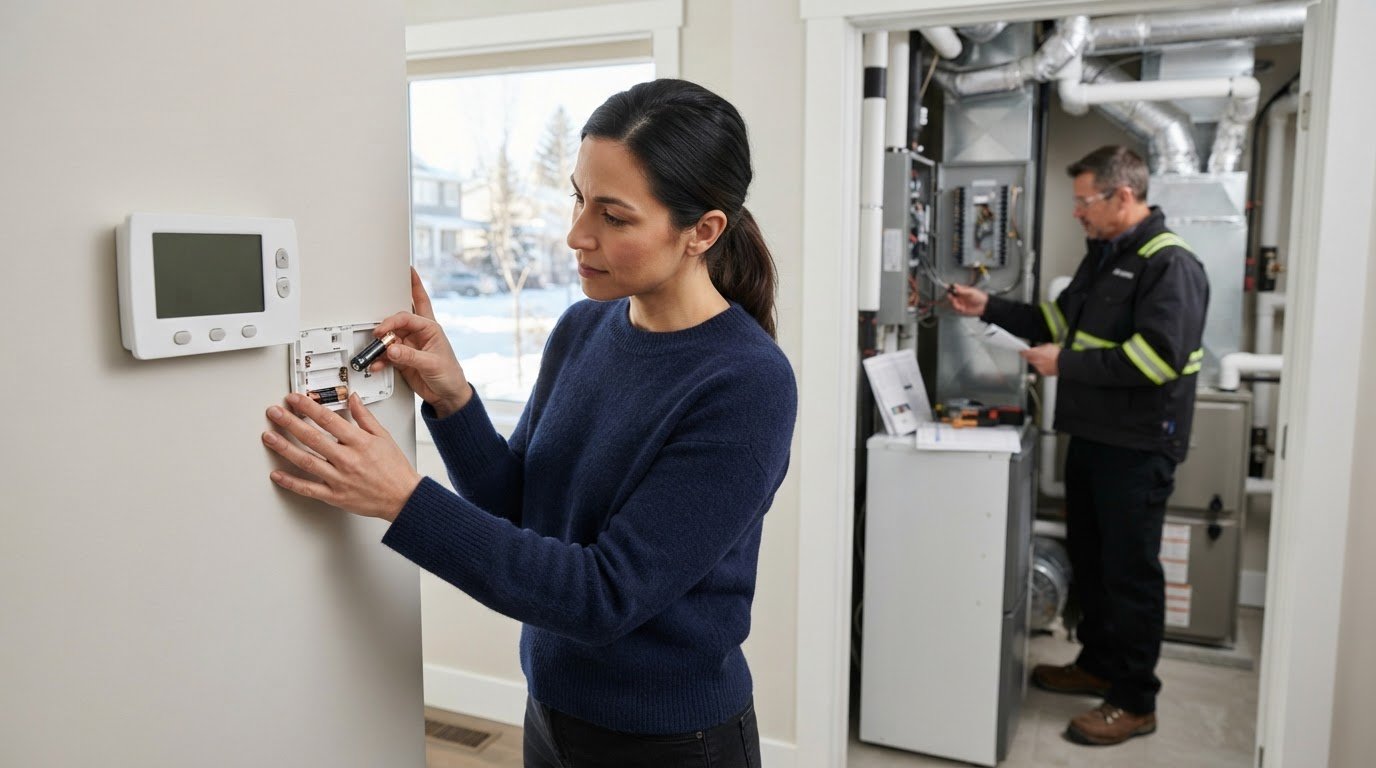
What if the thermostat isn’t the part that’s broken? When your Edmonton home won’t reach a comfortable temperature, a blank display or unexpected reading can make the thermostat seem like the cause. But troubleshooting a thermostat that is not working starts with a few simple checks and the reminder that the thermostat is only one part of your HVAC system.
Start by confirming the settings and looking for an obvious power issue. This guide explains what common symptoms can indicate, which low-risk steps to try, and how to tell when the issue may involve your furnace or air conditioner instead. You’ll also learn when to stop troubleshooting and get professional help.
If these checks don’t restore comfort, Zee Jay Mechanical provides HVAC assessment and repair for Edmonton homeowners. Red Seal Certified technicians can assess whether the issue involves the thermostat or the equipment it controls. For urgent HVAC concerns, the 24/7 emergency line provides round-the-clock support. Your comfort is our priority.
Key Takeaways
- When troubleshooting a thermostat that is not working, begin with visible settings and user-accessible checks before assuming a component has failed.
- If your thermostat uses batteries, check or replace them according to the manufacturer’s instructions.
- Compare the symptoms: an unresponsive display and a thermostat that responds but doesn’t activate heating or cooling can point to different causes.
- Stop if the next step involves wiring, opening HVAC equipment, or bypassing controls. Leave these tasks to qualified help.
- ZeeJay Mechanical serves Edmonton with Red Seal Certified technicians and a 24/7 emergency line for urgent HVAC concerns.
Troubleshooting a Thermostat That Is Not Working: Start With the Symptoms
A thermostat problem can interrupt heating or cooling just when you need it. Before changing settings or assuming a repair is needed, observe what the thermostat displays and how the HVAC system responds. Those details can help narrow down the issue without treating one symptom as proof that the thermostat has failed.
The thermostat communicates your selected temperature and operating mode to connected HVAC equipment. It uses temperature information to signal when heating or cooling should run. A problem may involve the thermostat, its power supply, a sensor, or the furnace or air conditioner it controls. For a general overview of what a thermostat does, see this background reference.
What does a blank or unresponsive thermostat display mean?
Note exactly what you see. A blank screen has no visible display; a frozen display remains lit but doesn’t change; and unresponsive buttons won’t accept input. Depending on the model, these symptoms may point to lost power or depleted batteries, but they don’t confirm that the thermostat is defective.
Make a note of any recent power outage, battery change, or electrical work. A technician can consider that timeline alongside the symptoms when assessing what may have changed. If your model uses batteries, follow the manufacturer’s instructions before checking or replacing them.
What do unusual heating or cooling symptoms tell you?
Compare the thermostat’s response with the equipment’s behaviour. The controls may be working while another part of the system is not, or the thermostat may be sending an unexpected signal. These examples are clues, not diagnoses:
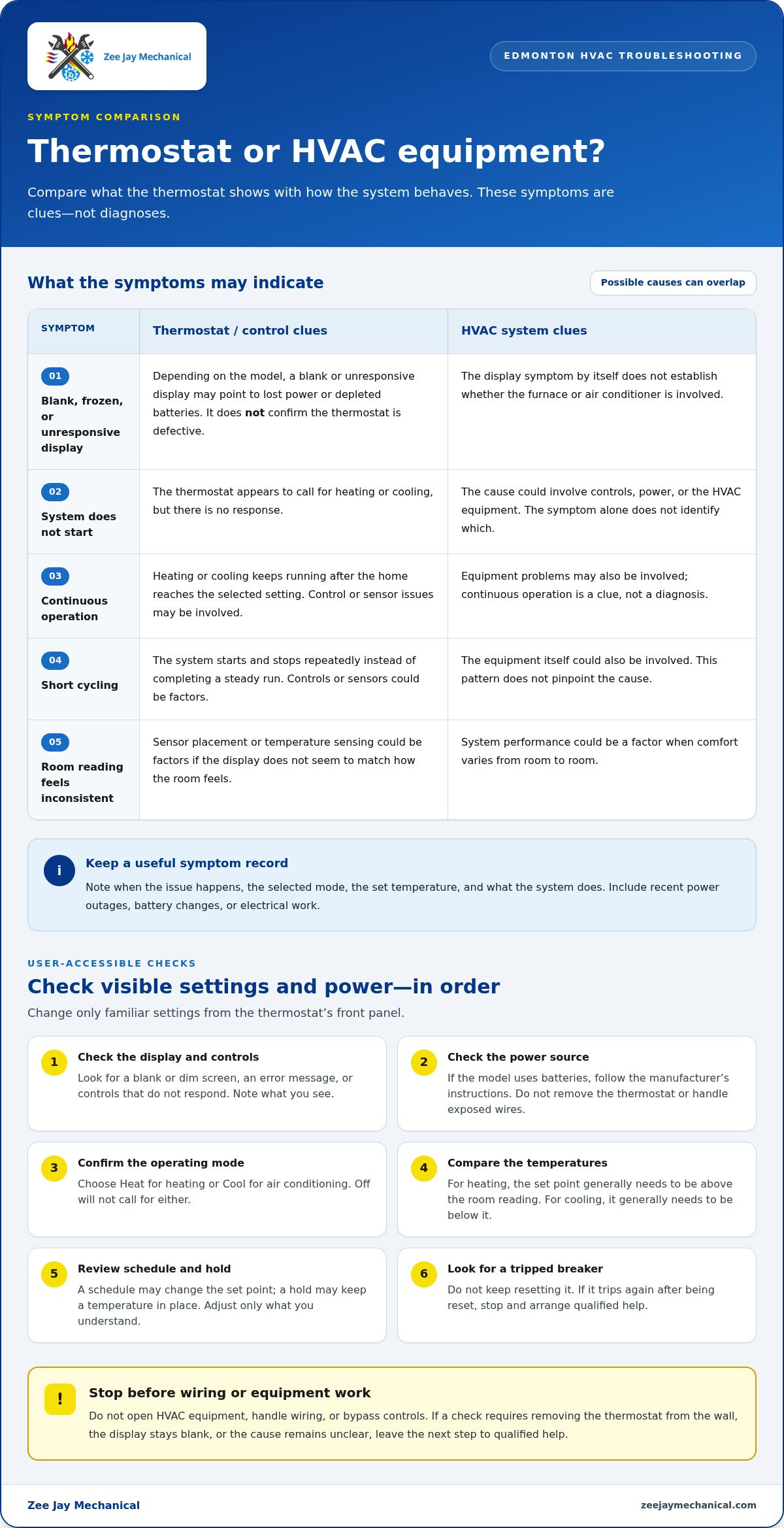
- No response: The thermostat appears to call for heating or cooling, but the system doesn’t start. The cause could involve the controls, power, or HVAC equipment.
- Continuous operation: Heating or cooling keeps running after the home reaches the selected setting. Control or sensor issues, as well as equipment problems, may be involved.
- Short cycling: The system starts and stops repeatedly instead of completing a steady run. This pattern can involve controls, sensors, or the equipment itself.
- Inconsistent room readings: The displayed temperature doesn’t seem to match how the room feels, or comfort varies from room to room. Sensor placement, temperature sensing, or system performance could be factors.
Record when the issue occurs, which mode is selected, the set temperature, and what the system does in response. For example, note whether cooling runs continuously only in Cool mode or whether the display freezes after a power interruption. A clear symptom record can help distinguish a display or control concern from a problem elsewhere in the HVAC system.
Check Thermostat Power and Settings Before Trying Anything More
Start with what you can see and adjust from the thermostat’s front panel. Work through these checks in order, changing only familiar, user-accessible settings. This first pass may identify a simple power or configuration issue without disturbing wiring or equipment. If a step requires removing the thermostat from the wall or opening HVAC equipment, stop and leave it to a qualified technician.
- Check the display and controls. Look for a blank or dim screen, an error message, or controls that don’t respond. Note what you see before making a change.
- Check the power source. Some thermostats use replaceable batteries; others appear connected to household power. If your model uses batteries, consult the manufacturer’s instructions and replace them only as directed. Don’t remove the thermostat or handle exposed wires.
- Confirm the operating mode. Select Heat when you need heating or Cool when you need air conditioning. A mode set to Off won’t call for either.
- Compare the temperatures. Check the set temperature against the room temperature shown on the display. In Heat mode, the set point generally needs to be above the room reading to call for heat; in Cool mode, it generally needs to be below it to call for cooling.
- Review the schedule and hold. A programmed schedule may have changed the set point, while a hold setting may keep a particular temperature in place. Check visible settings and adjust only what you understand. Avoid resetting unfamiliar configurations.
- Look for a tripped breaker. If you find one, don’t keep resetting it. If it trips again after being reset, stop and arrange qualified help instead of investigating electrical components yourself.
How should you check thermostat power safely?
A lit screen doesn’t necessarily mean every control is working, and a blank screen doesn’t prove the thermostat has failed. Check the manufacturer’s instructions to see whether your model uses batteries or household power. Replace accessible batteries only as directed. If the display remains blank or you’re unsure how the thermostat is powered, don’t take it apart.
Which thermostat settings can prevent a heating or cooling call?
Mode and temperature settings determine whether the thermostat is asking the system to heat or cool. Schedules, holds, and other visible settings can also affect the target temperature. For general information about smart thermostat functions, consult ENERGY STAR’s Benefits of Smart Thermostats. Don’t change unfamiliar settings just to see what happens; note them for the technician instead.
If these checks don’t resolve the issue, or you’re not comfortable proceeding, a professional HVAC assessment can help identify whether the problem is with the control or the equipment. ZeeJay Mechanical serves Edmonton and provides furnace repair. The 24/7 emergency line offers round-the-clock support for urgent HVAC concerns. Your comfort is our priority.
Thermostat or HVAC Equipment? Compare the Clues
A thermostat can display normally even when the system isn’t heating or cooling as expected. The display shows what the control is set to do, but it doesn’t confirm that the furnace or air conditioner received the signal or can respond. As you continue troubleshooting a thermostat that is not working, use the symptom pattern to guide your next step, not to declare a component faulty.
Use this table to organize what you observe. Possible sources are clues for assessment, not a diagnosis.
| Observed symptom | Possible source | Safe next action |
|---|---|---|
| Display is blank or buttons don’t respond | Thermostat power, batteries, or the control itself | Note the display condition and any recent power interruption. Don’t remove the thermostat. |
| Display responds, but heating or cooling doesn’t start | Settings, power to the HVAC equipment, a control connection, or equipment operation | Confirm the mode and setpoint, then note whether the system responds. Leave wiring and equipment checks to a technician. |
| System runs continuously or starts and stops repeatedly | Controls, temperature sensing, or HVAC equipment | Record the selected mode and when the pattern occurs. Don’t open the equipment to investigate. |
| Displayed temperature seems inconsistent with room comfort | Temperature sensing, the thermostat’s location, or system performance | Write down the displayed reading and what you notice in the room. |
When does the problem appear to be beyond the thermostat?
A responsive display paired with no apparent heating or cooling response is a reason to investigate further, especially after checking familiar user settings. The thermostat may be communicating a call, but equipment power, control connections, or HVAC operation could still be involved. AHRI offers information about HVACR equipment and HVACR Industry Standards, but identifying a fault in your home requires an assessment of the system itself.
Don’t open the furnace or air conditioner, test wiring, or try to bypass a control to determine where the problem lies. These steps can expose you to electrical or equipment hazards and make the issue harder to assess. If the symptom persists, arrange a professional HVAC diagnosis.
What should you record before requesting a diagnosis?
A short, clear symptom record helps explain what’s happening without guessing at the cause. Note the thermostat mode, displayed room temperature, setpoint, and any visible alert or error. Record whether the issue affects heating, cooling, or both, and describe what the HVAC system does after a setting change.
- When the symptom began and whether it is constant or intermittent.
- Any recent power interruption or change to the schedule or hold setting.
- Whether the display responds and whether the equipment starts, stops, or continues running.
These observations give a technician a useful starting point while leaving diagnosis to someone qualified to assess both the thermostat and connected HVAC equipment.
Know When to Stop Troubleshooting and Get HVAC Help in Edmonton
Safe checks have a limit. If the next step involves wiring, opening the thermostat or HVAC equipment, or bypassing a control, stop. Those tasks can create safety risks and make the cause harder to identify. During Edmonton cold weather, a persistent loss of heat deserves prompt attention. Don’t spend valuable time trying to prove whether the thermostat or furnace is at fault.
Which thermostat problems should you leave to a technician?
Leave electrical and internal equipment checks to a qualified HVAC technician. This includes handling exposed wires, opening the furnace cabinet, investigating an equipment connection, or attempting a bypass test. Stop as well if a breaker trips again after being reset, the equipment behaves unusually, or you notice a safety concern. Avoid repeated resets or further DIY changes.
- Wiring or internal components: Don’t remove the thermostat or touch wiring to inspect a suspected fault.
- Repeated breaker trips: Don’t keep resetting the breaker. A repeat trip needs professional assessment.
- Unusual equipment operation: Stop if the system repeatedly starts and stops or runs without responding as expected.
- Unfamiliar settings or controls: Leave them unchanged if you’re unsure what they do.
Unsupported adjustments can alter the system’s setup and make it harder to identify the original problem. Keep the thermostat and equipment settings as they are, and share what you’ve observed instead. Troubleshooting a thermostat that is not working should stay within checks you can safely complete using the thermostat’s normal user controls.
How should Edmonton homeowners respond when heating stops?
A minor display issue or a setting that needs correction is different from heat that remains off after safe checks. If the home is still losing heat, particularly during Edmonton cold weather, prioritize qualified HVAC assistance rather than continuing to experiment. The thermostat may be responsive while the furnace or its controls need assessment.
Before requesting help, gather the symptom notes from the previous section: the selected mode, displayed room temperature, setpoint, alerts, and whether heating, cooling, or both are affected. Include any recent power interruption or schedule change. Clear observations help the technician understand what’s happening without guesswork. If the issue appears to involve the furnace, request furnace repair in Edmonton from ZeeJay Mechanical. Its 24/7 emergency line provides round-the-clock support for urgent HVAC concerns. Your comfort is our priority.
Get a Professional Thermostat and HVAC Assessment From ZeeJay Mechanical
If safe checks haven’t restored heating or cooling, a professional assessment can help determine whether the concern involves the thermostat, its controls, or the HVAC equipment. ZeeJay Mechanical serves residential and commercial customers in Edmonton, Alberta. Its Red Seal Certified technicians assess HVAC concerns through a clear service process.
What should you expect when requesting HVAC service?
When arranging service, describe the symptoms rather than trying to diagnose the cause. Share whether the display is blank, frozen, or responding normally; whether heating, cooling, or both are affected; and what the system does when the thermostat calls for operation. Mention any visible alerts and the safe checks you’ve already tried. If you recorded the mode, displayed temperature, setpoint, or a recent power interruption, have those details ready too.
This information gives the technician a useful starting point. It doesn’t guarantee a particular diagnosis or repair, but it helps explain the concern and what you observed. ZeeJay Mechanical’s service process is:
- Schedule Your Service
- Expert Inspection
- Professional Repair
- Final Comfort Check
The inspection helps assess the reported issue before repair work proceeds. The final comfort check is part of the service process, not a promise about a particular result. If the cause isn’t clear from the symptoms alone, let the technician assess the thermostat and connected HVAC equipment instead of attempting wiring checks or equipment adjustments yourself.
How does ZeeJay Mechanical support Edmonton customers?
Thermostat issues can affect comfort at any time, especially when Edmonton weather makes reliable heating or cooling important. ZeeJay Mechanical provides a 24/7 emergency line and round-the-clock support for urgent HVAC concerns. Its Red Seal Certified technicians bring recognized trade certification to assessment and repair work. Share your observations clearly and leave technical testing to the professional.
When troubleshooting a thermostat that is not working, knowing when to stop is part of keeping the next step safe. If the display and settings checks haven’t resolved the issue, or your home is losing heat, qualified HVAC help can move the problem toward a proper assessment. You don’t need to identify the failed component before requesting service; a concise account of what you saw is enough to begin.
Your comfort is our priority. Contact ZeeJay Mechanical to arrange HVAC service in Edmonton through the ZeeJay Mechanical homepage.
Choose a Safe Next Step for Home Comfort
A thermostat issue doesn’t have to become a bigger repair project. Once basic checks are complete, resist the urge to keep changing settings or testing parts you can’t safely access. A qualified assessment can help move the issue from guesswork toward a clear plan, whether the problem is limited to the control or involves the HVAC system.
For homeowners, reliable heating and cooling support daily comfort. For businesses, consistent indoor conditions help keep spaces usable. If the problem is still affecting your home or workplace, arrange professional HVAC service rather than waiting for the symptoms to worsen. For readers in Australia looking for experienced support with residential or commercial climate control, redlecelectrical.com.au provides comprehensive electrical and air conditioning solutions. You don’t need to identify the cause before taking that step.
When troubleshooting a thermostat that is not working hasn’t restored comfort, ZeeJay Mechanical is ready to help Edmonton customers with residential and commercial HVAC needs. Your comfort is our priority. Take the next step and book HVAC service with ZeeJay Mechanical.
Frequently Asked Questions
Can a thermostat stop a furnace from turning on?
Yes. A thermostat that’s off, set to the wrong mode, or unable to communicate a heat request can keep a furnace from receiving a call to run. However, a furnace that doesn’t start can also have an issue unrelated to the thermostat. While troubleshooting a thermostat that is not working, check whether the display responds and whether the selected mode is Heat. If the settings look right, leave internal checks to a technician.
How long should I wait for heating after changing the thermostat setting?
There isn’t one wait time that applies to every thermostat and heating system. After adjusting the setpoint, allow time for the system to respond and consult the thermostat or furnace instructions for model-specific guidance. Some controls may delay operation. If the furnace still hasn’t started, note the time, setting, and any display message. Avoid repeatedly changing the setpoint, since that can make the system’s response harder to assess.
Can I remove a thermostat from the wall to check its wiring?
No. Don’t pull the thermostat from its wall plate or handle wiring as part of a basic check. Wires may carry electrical power, and disturbing them can create a hazard or introduce a new problem. If you suspect a loose connection, leave it in place and describe the symptoms to a qualified HVAC technician. You can safely record the thermostat model and visible alerts without opening or dismantling it.
Why does my thermostat click but the furnace does not start?
A click can indicate that a control inside the thermostat has switched, but it doesn’t confirm that the furnace received the signal or can operate. The issue may involve the control pathway, power, or furnace equipment. Note whether the click happens once or repeatedly, what mode is selected, and whether the furnace makes any sound afterward. Don’t open the furnace to trace the cause yourself.
Can a thermostat show the wrong room temperature?
Yes. The displayed reading may differ from how the room feels if the thermostat is affected by its surroundings or if its temperature sensing isn’t accurate. For example, compare its reading with another room thermometer placed nearby, away from direct sunlight or a draft. A difference is useful information, but it doesn’t identify the cause. Record both readings and where each thermometer is located.
How do I know if a thermostat is compatible with my heating and cooling system?
Check the thermostat manufacturer’s compatibility information against your HVAC system type and wiring configuration. A thermostat designed for one setup may not suit another, and smart models can have specific power or wiring requirements. If you’re replacing a control, note the current thermostat’s model. Have a technician assess compatibility before installation if anything is unclear.
What does a thermostat recovery message mean?
A recovery message commonly means a programmable or smart thermostat is adjusting operation so the home can reach a scheduled temperature by the time set in its programme. It may start heating or cooling before the scheduled change takes effect. Check the schedule and target time in the thermostat’s settings or manual. If the message appears unexpectedly or comfort isn’t restored, record when it shows and ask a technician to assess the control.
Disclaimer
The content of this article is for the general information purpose. Please contact us if you have any questions.